Service03 / 08
Design that sells: UX/UI design
A site can look good and still bring in no enquiries. We design websites and apps so that your customer knows where to click from the first screen and gets to the form, the cart or the phone.
- Stage
- Build
- Part of
- 5
- Quote
- free, within 48 h
- Reply
- within 1 business day
UX/UI design that turns visits into enquiries
If your site looks good but brings in no enquiries, the cause is usually the layout. The button disappears into the background, the key information sits three scrolls down, and the form asks for things nobody wants to share. Customers compliment a site like that, then close the tab. So we start UX/UI design with one question: what should the user do on this screen? Everything else is arranged around that answer.
The headline has to stop the reader, the offer section has to explain what sets you apart from competitors, and the call to action has to be the obvious next step. If we set the goals and audience earlier, as part of website strategy and direction, the design is that plan translated into screens. If there was no strategy phase, we ask the same questions on the first call.
You can tell a good design by the fact that the user never has to think: they know where they are, what they can do and what happens after a click. That clarity comes from heading hierarchy, spacing, contrast and the order of sections, so that is where we start. Colours, photos and details come once the layout works.
What UX/UI design includes
The design is made in Figma and moves from a structural sketch to an interface ready for code. We do not use ready-made themes: every screen is drawn from scratch, around what your site is meant to sell and to whom. We set the exact scope in the quote, but in practice it almost always consists of these elements:
Wireframes and prototypes
from a low-fi sketch to a clickable prototype you can walk through on your phone like a finished site.
UI design
typography, colours, imagery and details that match your brand and serve the job of each screen.
Design system, if the site is meant to grow
components, typography and colours you assemble new pages from.
Responsive variants
mobile-first design, from screens 375 px wide up.
Conversion-focused design
one call to action per section and a user journey with no dead ends.
Prototype testing, if you add it
we check it with real users before it reaches code.

How the design runs: from low-fi wireframe to approved prototype
We start with low-fi wireframes: the bare structure, no colours or photos. At this stage we talk about the order of content and the route the user should take; the shade of the button can wait. Once the layout is approved, we move on to UI design: typography, colour, imagery and detail. Finally we link the screens into a clickable prototype you can walk through on a phone and a computer like a working site.
You review the design in Figma with comment mode on. You leave a note on the exact element, so you do not have to write an email about 'that blue button on the left' and we do not have to guess which one you mean. Each stage includes two rounds of revisions. After a well-run strategy phase they are usually enough, and if it turns out a third round is needed, we quote it separately and tell you before we start.
You approve the design before any code is written, so you never pay to rework finished views. Whoever builds the site gets the full set: every screen, state and responsive variant. With us, the design and the code are handled by the same person, Kacper Baranowski, so nothing gets lost between the wireframe and the website build and code.
How we design for mobile, conversion and accessibility
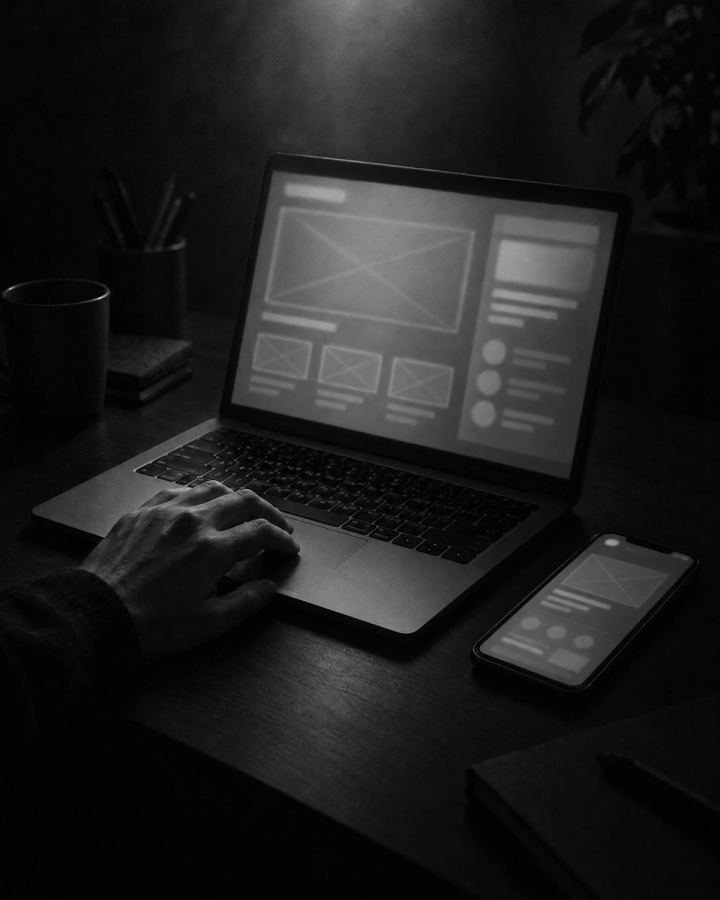
Most of your customers will open the site on a phone, so we start the design at a 375 px wide screen and only then expand it to desktop. Buttons sit within thumb reach, forms are short, and the most important information fits on the first screen. Desktop gets more space and the same logic.
For the site to sell, we keep one main call to action per section, lead the journey with no dead ends, and place trust signals where doubts appear. Contrast, readable type, a visible focus state and keyboard use are planned in the wireframes already, because WCAG 2.2 AA accessibility is one of our acceptance criteria for a site, and it is cheaper to design it in from the start than to fix it after launch. If animation and 3D are in scope, this is also where we decide where motion helps and where it distracts.
Stores and apps add states that are easy to forget: an empty cart, a form error, data loading, a confirmation after sending. We design them together with the main views, because those are the moments when users most often give up. On the prototype you see them before your customer ever would.
How much UX/UI design costs and what drives the price
The price depends on the number of views, states and variants, on whether you need a full design system, and on whether you already have a visual identity. A business card site with a few views is a different scope from a site with an offer, a blog and landing pages, so we do not give one figure without a call. You get a free quote with the scope and schedule written out within 48 hours of the call, so you decide knowing the figure and the dates.
If you have a brand book or visual guidelines, we follow them. If you do not, we set the visual direction together during the design stage, and if you want, we extend the scope to an identity built from scratch. You can also add three standalone items to the design, at the same prices as in our pricing. They pay off most when your own team will grow the site later, or when the customer journey is long and costly, as in a store or an app.
Design system
components, typography and colours described so that your team can grow the site without asking us about every change. You can hand it to your developer or leave the build to us. From PLN 2,500 net.
Usability testing
before the design is closed, we test the wireframes with real users from your target group. You learn where they stop and why they leave before anything reaches code. From PLN 1,500 net.
Mobile screen design
phone views designed separately, laid out for thumbs and a smaller screen instead of an automatic downscale of the desktop. From PLN 1,200 net.
What you get after the design: Figma files, components and a free hand
After sign-off you get the Figma source files: every screen, component and style. You can pass them to another vendor or to your own team without asking anyone for permission. If a design system was in scope, you also get a component library for assembling new pages without designing from scratch.
If we build the site, the design goes into code one to one, with the same spacing, states and motion, and you have 30 days of free fixes for bugs in our code, counted from acceptance. If someone else builds it, they get a complete set of materials and nothing is left to interpretation. Either way, the live site looks like the approved prototype.
When you want to add a section, a campaign landing page or a new subpage after launch, you assemble it from the ready components of the design system instead of ordering a design from scratch. A year on, the site still looks like one whole, and every change takes less time.
UX/UI design in our offers: websites, stores and apps
Design is part of every offer we have. For business websites it leads to an enquiry or a call. In online stores we design the buying path from the product page to payment. For industry websites the layout follows the habits of that industry's customers: a menu and booking for a restaurant, a portfolio for a contractor, proof of expertise for a law firm.
In digital products we start with user flows and a clickable prototype before any code exists. That is how we work on a web app and a mobile app, where gestures and thumb navigation come into play. You can also order the design on its own, for example for your own developer. Tell us what you are building and when in the form at the bottom of this page. We reply no later than the next working day, and you get a quote with the scope and schedule within 48 hours of the call.
Where thisservice works
This service is part of these projects. You can also order it on its own, for the site you already have.
Scope at a glance
- Wireframes and prototypes
- UI design
- Design system
- Conversion-focused layout
Part of these offers

Business websites
A business-card site from PLN 3,000 net, a site with a content panel from PLN 4,500. Ready in 2–6 weeks, with technical SEO and WCAG 2.2 AA accessibility.

Online stores
A store on Shopify or headless, with BLIK, Przelewy24, InPost and DPD. From PLN 8,000 net, live in 3–12 weeks.
Industry websites
A website for a hotel, restaurant, law firm, accounting firm, construction or transport company. From PLN 4,500 net, 2–6 weeks.

Web application
A client dashboard, SaaS or MVP on Next.js and React, with sign-in, database and integrations. From PLN 15,000 net, 4–16 weeks.

Mobile app
PWA or Capacitor: one codebase for iOS and Android, push and offline mode. From PLN 12,000 net, 3–12 weeks.
How we work
- 01
Conversation and brief
You tell us what you want to achieve and we ask questions. Scope, schedule and quote reach you within 48 hours of the call.
- 02
Design
We design in Figma, screen by screen, with your feedback along the way. The source files stay with you.
- 03
Code and launch
We code to the design, test on real devices and check accessibility. The site goes live on your domain.
- 04
Support and growth
For the first 30 days after handover we fix bugs in our code for free. After that we support the site in a scope we agree together.
Questions about this service
Your situation not here?
Describe it in a few sentences. We reply with specifics, a few questions to narrow things down, and a time for a call.
Start with a free quoteHow many rounds of revisions are included in the price?
Two rounds at every stage, from wireframes to prototype. After a well-run strategy phase they are usually enough, because most decisions are made before the first screen is drawn. If a third round is needed, we quote it separately and let you know before it starts.
Do you deliver the design files or just the finished website?
Both. The Figma source files, with every screen, component and style, are handed over to you when the project is complete. You can pass them to another vendor or to your own team, and if we build the site, the code is yours as well.
How does the design approval process work?
You review the design in Figma with comment mode on and leave notes directly on the elements they concern. After each round you get a revised version, and we start the next stage only once you have approved the previous one. Coding starts when you sign off the prototype.
Will the design follow our visual identity?
Yes. If you have a brand book or guidelines, we design within them: the same colours, typefaces and rules. If there is no identity yet, we set the visual direction together during the design stage, and we can extend the scope to designing one from scratch.
How much does website design cost?
It depends on the number of views and states, the scope of the design system and whether you already have a visual identity. You get the exact figure in a free quote within 48 hours of our call. The add-ons have fixed starting prices: design system from PLN 2,500, usability testing from PLN 1,500, mobile screens from PLN 1,200 net.
Can I order the design without the build?
Yes. You get the Figma source files with components, states and responsive variants, so your developer has everything needed for the build. Tell us what you are building and who will code it, and we will quote the design on its own.
Next service
Build and code
We turn the design into code on Astro or Next.js. You sign off once the site scores at least 85 in PageSpeed Mobile.

Got a project?
Tell uswhat you need.
Two sentences: what you have and what you need. We will ask the rest on a call.
- Reply
- within 1 business day
- Quote
- free, within 48 h
Got it.
Your message went straight to Kacper. He replies by the next business day at the latest.